The board
The Kanban board is where all tickets live and where humans work the queue.
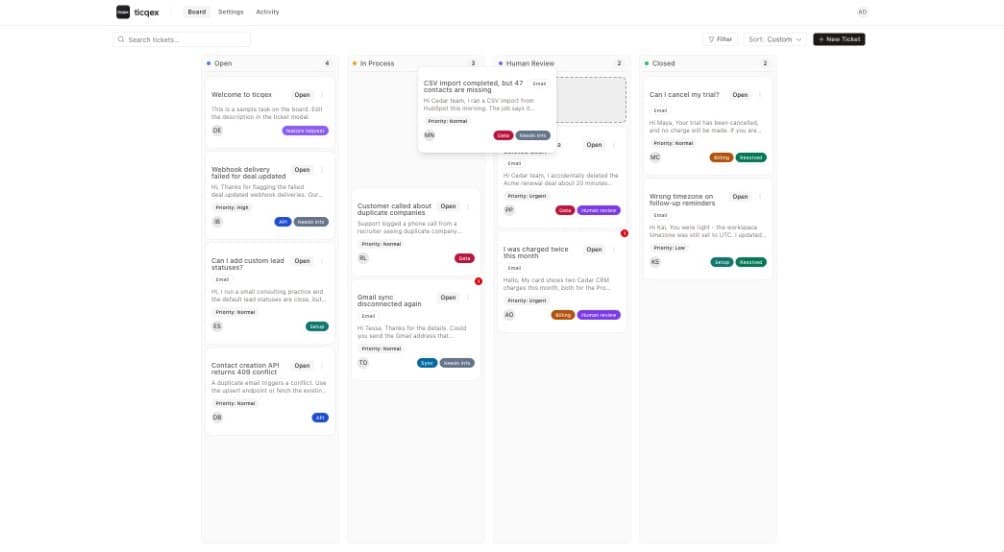
The board at /board shows one lane per visible status column. Lanes are configured in Board settings.
Moving tickets
Drag a ticket between lanes to change its status, or change the status from inside the ticket. The board updates in realtime for everyone via Supabase subscriptions.
Search
The search bar performs a text search across tickets.
Filters
Filter the board by:
- Assignee
- Contact
- Ticket kind (task vs conversation)
- Channel and origin (manual, API, email)
- Tags
- Unread state
- Custom ticket fields
Sorting
Each lane can be sorted by updated or created date (ascending/descending), or by a manual custom order that is saved per user and lane — drag tickets within a lane to arrange them.
Unread badges
Tickets with channel messages you haven't read yet show an unread badge. Opening the ticket marks its messages as read.
Lane pagination
Long lanes load incrementally — use Load more at the bottom of a lane.