Email conversations
Reply to customers from the ticket — threads, drafts, attachments, and snippets.
When the email channel is enabled, inbound emails become conversation tickets and the ticket modal shows the full email thread.
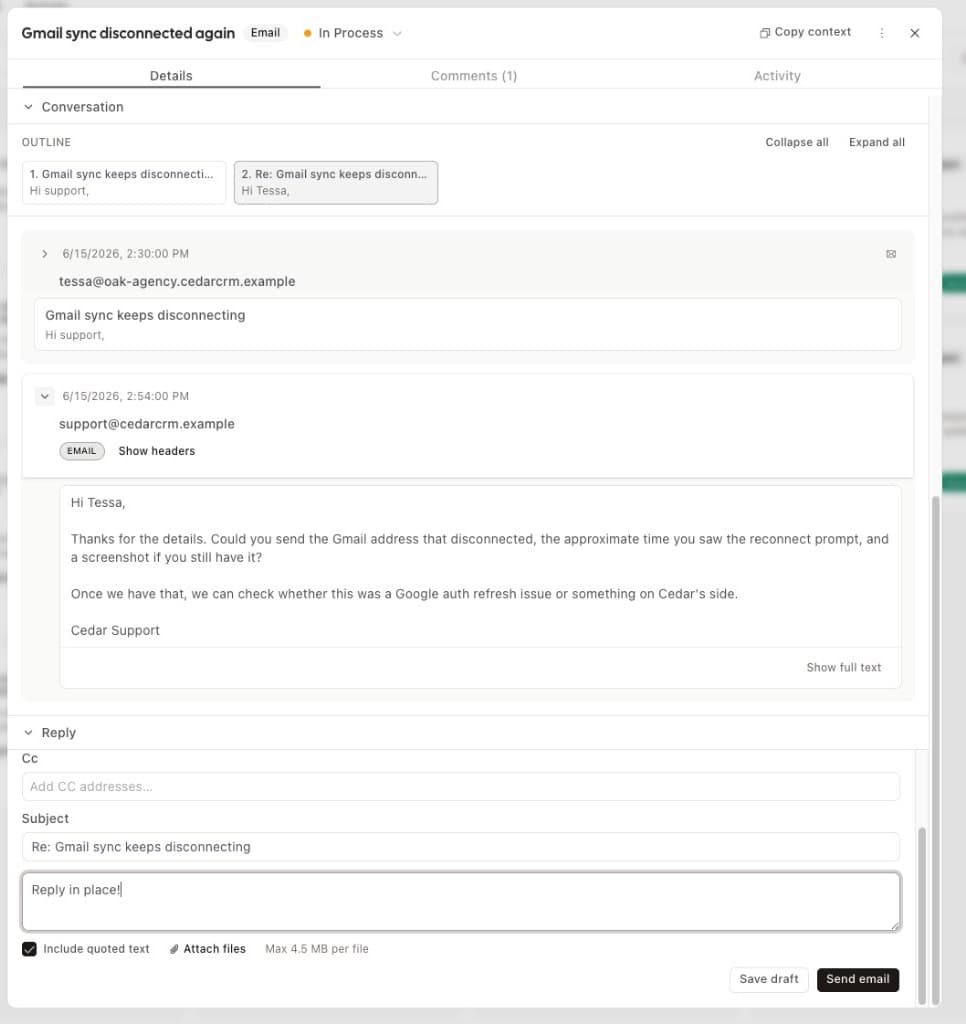
The thread
Messages display in the order configured in Email settings (oldest or newest first). Inbound and outbound messages are threaded together, including delivery events such as bounces.
Composing replies
The compose area supports:
- Reply and reply-all, with editable To/CC recipients
- Subject editing and quoting the previous message
- Attachments
- Snippets — canned responses defined in Email settings, inserted from a picker
- Your org-wide email signature, appended automatically to outbound replies
Drafts
Replies can be saved as drafts and resumed later — drafts can be updated, sent, or deleted without leaving the ticket.
New inbound tickets
A new inbound email creates a ticket in the default inbound status lane (configurable in Email settings), with the sender created or matched as a contact.
Starting a conversation by email
When the email channel and provider are enabled, use New email on the board (under the create menu) to open a conversation and send the first outbound message. The ticket title defaults as the email subject (no Re: prefix). You can also do this via the API or MCP with kind: "conversation" and an outbound body instead of a contact message.