Tickets
Ticket kinds, lifecycle, assignment, tags, and custom fields.
Ticket kinds
Ticqex has two kinds of tickets:
- Task — a plain Kanban card with an optional description. Created manually from the board, or via API/MCP. No channel or contact address.
- Conversation — a threaded channel ticket (email today). Always linked to a channel, a contact, and a contact address. Created by inbound channel messages, by sending a new email from the board (when the email channel is enabled), or via API.
Origins
Every ticket records how it entered the system: manual (created in the UI), api (REST or MCP), or email (inbound channel).
Creating tickets
Use New ticket on the board to create a task ticket. When the email channel is enabled, the create menu also includes New email — that opens a conversation and sends the first outbound message.
Conversation tickets also arrive through inbound channel messages or the API (message for contact intake, or outbound to start by email).
Working a ticket
Open any card to get the ticket modal (also deep-linkable at /board/tickets/<id>). From there you can:
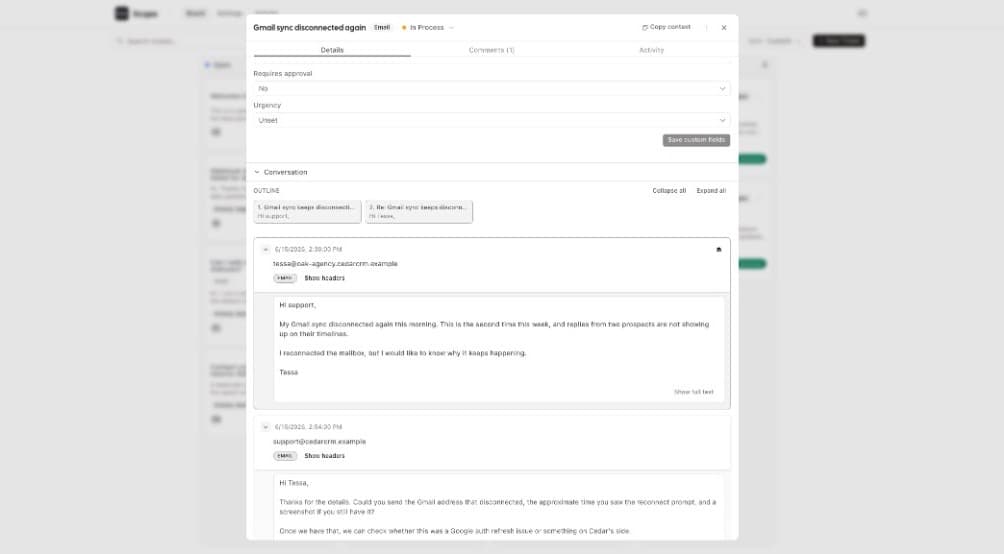
- Change status — same effect as dragging between lanes.
- Assign — pick any staff member as assignee.
- Tag — apply org-wide tags (managed in Board settings).
- Edit custom fields — any fields defined in Custom fields.
- View and edit the contact — including contact custom fields.
- Reply (conversation tickets) — see Email conversations.
- Comment internally — see Internal notes.
Copy context
The ticket modal can expose a Copy context button that exports the ticket as markdown — handy for handing a ticket to an AI agent. What gets included (contact, contact custom fields, ticket custom fields, an optional prepend text) is configurable in Board settings.
Deleting tickets
Tickets can be deleted from the modal. Deleting a conversation ticket also removes its message thread, so the dialog asks for explicit confirmation.